About Me

My photo
Currently working as a Pen Tester, I'm interested in Android and web apps.

Tuesday, 17 August 2010

Populating a 'Drop Down List' from a SharePoint List

I've been playing around with SharePoint Lists and I've found a handy way of populating a drop down list in SharePoint with another SharePoint List. Here is a quick guide;

In this example I'm creating a place where a user enters their name and then selects what country they are from. So I create two Lists
  • User Details
  • Countries
User Details will have two columns; 'Name' and 'Country'.

Step 1
Create the Custom Lists
Site Actions > Create > Custom List
Add columns;

Settings > Create Column
or Settings > List Settings > Create Column


The above screen shot is of the Country column being created within the User Details List. Notice that instead of filling in a list of countries in this column I simply put 'none' in the "Type each choice on a separate line" box. I'm not listing countries here because I want to populate this from a SharePoint List that I've made called Countries.


Step 2
Now create a Document Library
Site Actions > Create > Document Library

Then create a Web Part page. Choose the layout as a full page and add it to the document library just created.

Step 3
Launch SharePoint Designer and open up the Web Part page just created.


Delete the 'click to insert Web Part' from the page and add a Custom List form to the page.
Insert > SharePoint Controls > Custom List Form...


Then select the List you want to populate, in this case it's the User Details List.

Now right click where the Country drop down is and select the following;
Format Item as > Drop Down List


Make sure the drop down list, which will now have unbound, is not selected (click beside it). Go over to the right of SharePoint Designer 2007 to the window with the tabs Toolbox, Data Source Library... etc. and click the 'Data Source Library' tab.
*If it is not there go to the top toolbar (File, Edit, View...) and click on Task Panes -> Data Source Library.

Find the List that you want to populate the drop down with, in this case the Countries list will populate the drop down. Click the list and click inset data source control.

Now go back to the drop down and click the little arrow and then click Data Fields.

A window will pop up, the first option is the data field just leave it as this is the one selected (although you can change it if you want). In this case the data field selected is Country in the User Details List.

There is also an option here to present the user with data from one column in the List and once selected by the user a value is entered from a different column in the List from a corresponding row. This is handy if you want a description for the data presented to the user but want a number value to be entered into the List.

Step 4
All that needs to be done now is to change the view the user gets when they are creating a new Item from the default view to your new Web Part page with the custom form.

Go to the Lists on the left hand side of SharePoint, expand Lists and then right click the User Details List and click Properties.


Then in list properties click the 'Supporting Files' tab and do two things
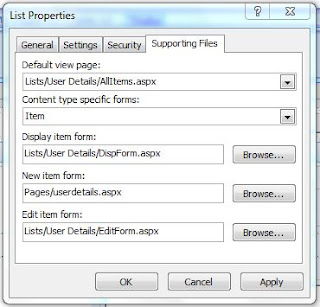
  • *Very important that under 'Content type specific forms:' you change it from 'Folder' to 'Item'.
  • Then change the 'New item form' to the Web Part page with the custom form (Pages/userdetails.aspx) by pressing browse and locating you new page.


All done. Now when a user clicks 'New Item' in SharePoint they will be brought to the Web Part page and the drop down list will be populated from another SharePoint List.

Friday, 13 August 2010

Going Ahead with SharePoint

We sat down this week and it was decided to go ahead with SharePoint even if some of the features are sacrificed. The main aim of this project is to have a prototype ready so that customers can say they like it or they don't.

I've been messing around with the data and SharePoint Lists and I will admit it looks handy to throw something together. I've had to rethink a lot of the original design as I based it on a relational database. I've put some Lists up and messed around with them, but I'm still waiting on SharePoint Designer to be installed on my machine. I've downloaded the free copy of SharePoint Designer 2007 onto my laptop but I can't really use it with the wireless network in here. Maybe with SharePoint Designer I will find a way of including all the features, I have some ideas and I'll update here with the progress.

Thursday, 5 August 2010

Database Design

I'm waiting on a meeting to discuss my conclusion that SharePoint is the wrong platform and then hopefully choose another platform I suggested. While I'm waiting I've decided to go ahead with designing the database. So much stuff has come flooding back on databases I haven't done since first year.

To design the database I am modelling it on the ANSI/SPARC architecture. This architecture has been around for years and it is tried and tested. It allows the views of the database to be separated from the actual physical representation. The external level in the architecture allows different users to have a different view of the database e.g. admin will have a different view from a normal user. The internal level is how the data is actually stored where it is concerned with disk space, indexes, compression, security etc.

When designing the database the first part that is considered, and my case is no different, is the conceptual level where entities, relationships, constraints etc. are all planned out. I am using the following process to design this conceptual level;

  • Determine the purpose of the database

  • Find and organise the information

  • Divide the information into tables

  • Divide information in the tables in columns (attributes)

  • Set primary keys for each table

  • Identify relationships (cardinality)

  • Refine the design (populate with test data and run queries then adjust design according to tests i.e. add another table or attribute to a table etc.

  • Apply normalisation rules
Database Design Programs
In my search for free ER diagram tools I stumbled upon a program called RISE, - http://www.risetobloome.com/Page_1_S.aspx?ITEM=1853 as the computer in the office here only has a watered down version of Microsoft Visio that doesn't have the option to create ER diagrams. Anyway the program is good, got the job done and I produced two ER diagrams from it that the boss was happy with. Then I came across MySQL Workbench - http://wb.mysql.com/ which I've never seen before, since I haven't designed a database in ages. It's even better than RISE because I've created the database from an ER diagram without the need to code each and every SQL table and relationship etc. etc. You can forward engineer your diagram and the database goes right into a selected MySQL database. What more do you want. You can also perform CRUD operations on the database from Workbench. It is a great tool and I'm really happy with it.
Issues
A couple of things came up during the design, one of which was the many-to-many relationships. I've dealt with this by using junction tables to break up the relationships from a many-to-many to one-to-many or zero-to-many. A good example, that I'm going to rob but it's probably been used hundreds of times anyway, is the situation of the orders table and the products table. One order can contain many products. One product can appear on many orders. This causes the problem of where to put the foreign keys to link these two tables without getting duplicate information. The pk ProductId as a foreign key in the orders table would mean that for more than one product per order there would be more than one record on the orders table. The pk OrderId as a foreign key in the products table would mean more than one record in the products table for each product. So the junction table called OrderDetails would take both the ProductId in the products table and the OrderId in the orders table as foreign keys to form a primary key. This solves the problem of the many-to-many relationship and the picture below illustrates the point.
Foreign key problems also occurred mainly in the form of the error -
errno:121 (Duplicate key) with CREATE TABLE
or
ERROR 1005 (HY000): Can't create table '.' (errno:121)
This means that foreign keys must be unique to the database, so you cannot have a foreign key in one table with the same name as a foreign key in another. One way I was going to check the foreign keys was to painstakingly review each one in the ER diagram. However, thanks to a blog I came across I used the following query to review the foreign key names;
SELECT
constraint_name,
table_name
FROM
information_schema.table_constraints
WHERE
constraint_type = 'FOREIGN KEY'
AND table_schema = DATABASE()
ORDER BY
constraint_name;
This query is taken from http://thenoyes.com/littlenoise/?p=81
I'm going to run some tests on the database with some queries and continue to improve it. Hopefully I get to sit down and discuss not using SharePoint and then all I have to do is rename this blog!?

Friday, 30 July 2010

The Wrong Platform

So I've made my decision, I think it's the wrong platform. Developing on SharePoint seems like a nightmare and for this project I would have to bend the platform to suit the needs of the system. There's plenty of resources out there where people talk about joining SharePoint Lists and manipulating Lists using Views and Web Parts but it's all unnecessary coding to get something simple to work! I can't guarantee the performance of the application or if it could be further developed due to the restrictions with storing data in SharePoint. Storing unrelated data with a 2000 item cap is bad. The project could not go from prototype to commercial release using SharePoint. To me SharePoint is aimed at people who can't code and just want a simple team website.

Sure it'll save me time as I don't have to code a user database or any lower level code but at the price I can't develop what I want, I'm restricted. It'll save time with testing too but I can see it getting messy.

I'm left scratching my head why SharePoint clumps information into a List and you can't use SQL. It's pointless having a system like that because there is so much power with SQL, I just don't know? I've read so many blogs and articles about developers constantly coming up with workaround for their SharePoint site and I don't want to be one of them. Also so many people frustrated trying to import a database into SharePoint.

I've come to dislike SharePoint without even getting stuck into it. Why use SharePoint when I can use PHP and MySQL. There are probably situations where SharePoint is a great idea but for this project it's not.

Wednesday, 28 July 2010

First Impressions

I'm just finished college and I got a research position with a company called BH Consulting. I'm so happy because it is difficult to get a job in this climate, especially one that you want. Anyway I've been asked by the company to build a web application but to develop it on the Microsoft SharePoint platform. My background in college was developing in Java with some C but I've never developed on a Microsoft platform. So I'm looking at ASP and C# and thinking it's not that dissimilar to what I was doing with Java and the syntax is not too bad, this is going to be okay (famous last words!).


At first glance SharePoint looked like a great idea and a powerful platform to develop on. But I did have some concerns, one of which was the fact that lower level coding has been taken away from developers. The idea being products and solutions can be developed quickly and easily. You don't build a website from scratch using ASP on SharePoint; instead you use ASP to extend SharePoint sites. This is fine using templates and extending them for a company that wants to create a space where people can work on a document or a task list or a wiki or something, but can the SharePoint platform be used to develop a really powerful web application? This is what I have to figure out; this is why I've been hired into a research position. Can it be done and if not what would I recommend.


With this project, and I suppose with any project, the developer needs to know what the client/boss requires from an application, what is their vision essentially. So I gathered information and I've been building upon a document while I'm waiting on the software I need on my machine here in the office. One of the conclusions I've come to is the database is the driving force behind this application and it needs to be designed and implemented to a high standard. My opinion is the application needs to use the concept of a relational database. After all, relational databases have been tried and tested and they work for powerful and demanding web applications.

So, logically I thought I might as well jump in and start designing a relational database. But... there's a bit of a problem. SharePoint does not support relational databases. What I mean by this is you cannot write SQL when developing for SharePoint and you cannot implement any relational database using the SharePoint platform.

There are options though, I could design and implement a relational database on an SQL server and import it into SharePoint. This does mean I need an SQL server on top of the other software for SharePoint and anywhere this application rolls out needs an SQL server. This may or may not be a problem, but there can't be any uncertainties in this solution. Another concern is I don't really know how well SharePoint interacts with an external database?

Ideally I'd just like to use the SharePoint platform and nothing else, so I was looking at SharePoint 'Lists'. Lists resemble tables in a database with columns and rows and you can add different data types, but, and this is a big one, -Lists don't relate to one another like tables in a relational database do. To get lists to relate to one another you have to write things called 'Web Parts'. At this stage I really don't know how good a solution this mixture of Lists and Web Parts will be? Also Lists only support up to 2000 items, not good when the database grows.

I'm starting to think SharePoint is fine for simple, unimaginative team sites using templates and clumping data here and there. Fine if all you want to do is something simple but for something that is specific and requires the power of a relational database back end, then SharePoint can't replace the power of current web technologies.

Bottom line is;

  • Will an external relational database work well with SharePoint and if it does will the use of an SQL Server cause problems when the product rolls out?

  • Will Lists and Web Parts be powerful and dynamic enough to get this job done?

  • Will it be the case where ultimately SharePoint is simply the wrong platform?